• djogzs
    Welcome
Tampilkan postingan dengan label E-Mail. Tampilkan semua postingan

Email applications to Quick Writing for BlackBerry Playbook

26 April 2012 0 komentar
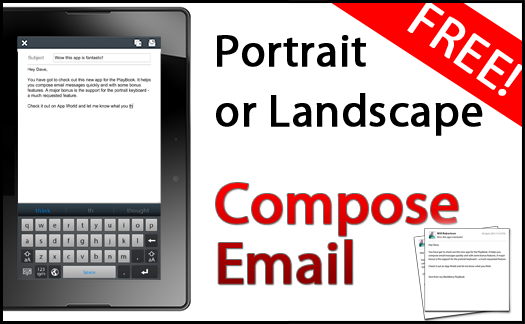
New free application called "Compose Email" which is a simple application to quickly write a email to then send them to the application messages. The main feature is that it supports the Portrait orientation and keyboard, the application message is not.

Email applications to Quick Writing for BlackBerry Playbook

Features:
  • Compose email in Portrait or Landscape
  • Integration with the native Messages App
  • Automatic copy-to-clipboard
  • Copy & Paste
  • Launches faster than Messages
  • Matches style of the 2.0 Messages, Contacts, and Calendar apps
Download Compose Email 
Baca selengkapnya »

Applications that Can Lock the BlackBerry Using the SMS / Email

18 April 2012 0 komentar
You worry and fear when the Blackberry behind at home, at work or anywhere in an unsafe place, a feeling that there was no one else was afraid to open up and play your Blackberry.

When the contents of the Blackberry is a great privacy is important and should not be any other person who knew the contents of the Blackberry, you can use Remote Lock - Lock device by sending an Email or SMS. applications may help to overcome the fear of the event the above conditions. BB is left can be locked remotely (remote) via SMS or Email to a format that has been set on your Blackberry.

Features:

  • Help setup wizard
  • BB locking via SMS or Email
  • Password to lock
  • SMS or Email format for safety
  • BB locking only accept orders according to a format that's been made specifically
  • Some question as to forget the password verification
  • Setting a password to access the application
  • Support for OS 4.6 upwards
  • free

Applications that Can Lock the BlackBerry Using the SMS / Email

Applications that Can Lock the BlackBerry Using the SMS / Email

Applications that Can Lock the BlackBerry Using the SMS / Email


Note:
The application runs without any icon on the homescreen, to guide the use and its settings, please go to the setup wizard Remote lock on 3rd party menu (Options, Third Party Applications, Remote Lock).

Download Remote Lock - Lock device by sending an Email or SMS!
Baca selengkapnya »

Email++ Updated v2.5.1 for BlackBerry

09 Maret 2012 0 komentar
Devcellent Solutions has issued an update to the very popular Email ++ app for BlackBerry. If you have previously purchased Email ++, you can now update to version 2.5.1.

Email++ Updated v2.5.1 for BlackBerry

New features:

  • performance Optimization
  • Email + + Icon looks from the App Switcher
  • Email + + is currently selling for only $ 2.99 at the BlackBerry App World
Baca selengkapnya »

Ace eMail Viewer for BlackBerry

21 Februari 2012 0 komentar
Your blackberry users who frequently use the email facility to help you make it easier to interact. Ace has no application to view email Email received on your BlackBerry from text to picture, image, and can read the email with the font color and smiley can also be shown.

Ace eMail Viewer for BlackBerry

Ace eMail Viewer for BlackBerry


Normally your BlackBerry® phone shows you emails in plain text format, which many times includes long website links, images links and email addresses etc. Smileys also appear as plain text like :-

With Ace Email Viewer in your BlackBerry phone, emails appear much better than in native email Messages application. It displays the images that were sent in emails, smileys, colorful text, customizable background patterns, font style, size etc. It offers several options that you can customize as per your needs.

Pictures are worth thousand words ... so check all the screenshots to get an idea of how emails appear in Regular view and in Ace Email Viewer.

Features:
* Fast download and installation - takes less than 2 minutes
* Seamless integration with native email Messages application
* Light-weight - uses very little memory
* Makes emails more readable
* Shows images in email
* Shortens the hyper links for convenient reading
* See what they feel - supports smileys
* Add emails to Calendar as new appointments
* Add emails in ToDo list as new tasks
* Optionally pre-download images to make it fast when opening the emails
* You can also choose to show images on-demand on per-email basis
* Cache images on sd-card or in internal memory of the phone
* Supports BIS, BES, APN and Wi-Fi connections
* Automatically detects connection type. So most of the users don t need to bother about configuring the connection
* Fully customizable font style, size colors, background patterns, etc.
* Shows in-line replies in separate color to make emails more readable
* Also shows email signature in different color
* You can choose different colors of email headers for different email accounts
* Auto Update notifications Optional - you can turn them off, if not required

Baca selengkapnya »